Need a whole class to read the same book at the same time? Class Set Bookings allow you to borrow multiple copies of a single title for a fixed duration.
Video Tutorial
We have created comprehensive video playlists to guide you through every feature. Whether you need a quick "how-to" on a specific topic or a full walkthrough, these are great resources to have on hand:
What are Class Sets?
A Class Set Booking allows you to borrow multiple copies of a single title for a fixed duration. This is the most cost-effective way to manage English curriculum requirements, literature circles, or book clubs without purchasing permanent licenses that sit idle for the rest of the year.
Class Sets on ePlatform:
- Number of Copies: Select between 3 and 150 copies of a title.
- Loan Duration: Select the loan period between 1 and 12 months.
- Cost: Because we utilise existing copies in the Shared Collection where possible, the price is significantly lower than buying individual licenses.
How to Book a Class Set
1. Find your Title in the Shop
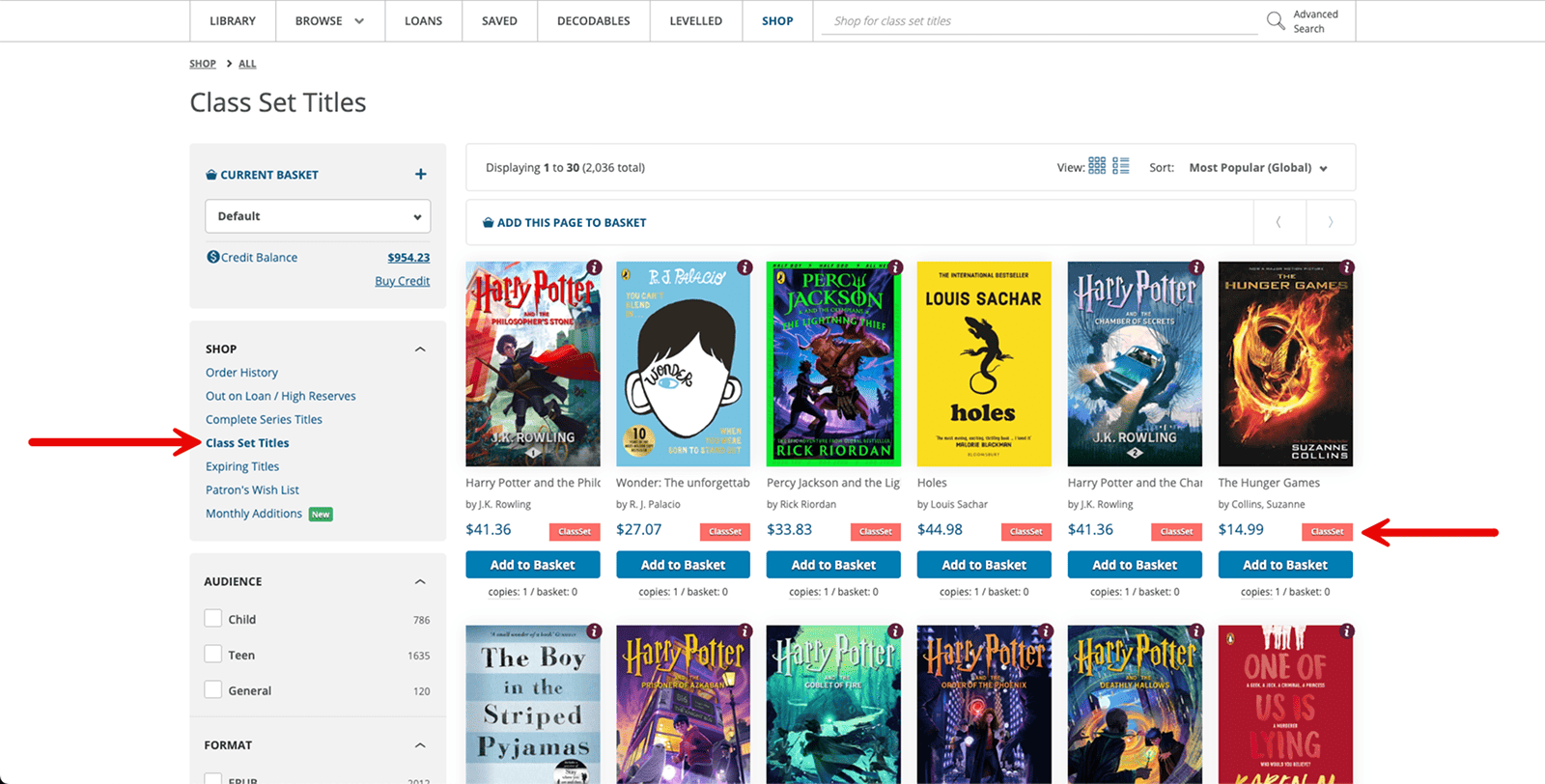
Go to the Shop, search for your title and click on it. You can also use filters to browse for titles available as a class set.
2. Select "Class Set Booking"
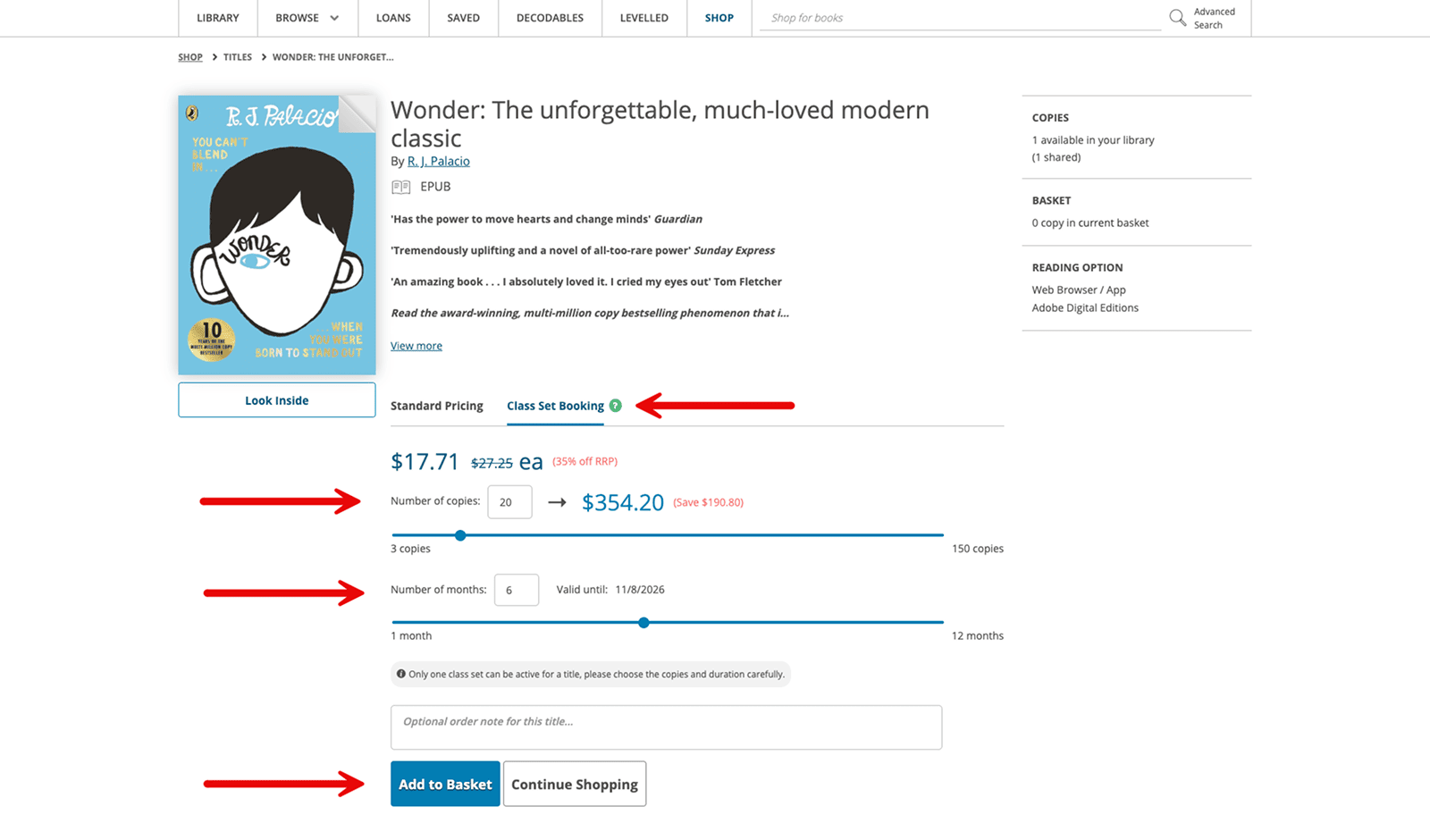
From the title page, select "Class Set Booking" to display the class set booking system.
3. Select the Number of Copies and Loan Duration
Use the sliding scale to select how many copies of this title you would like available and for how many months. The cost and validity period will be displayed.
4. Select "Add to Basket"
Once you are ready to complete your purchase, select "Add to Basket". A notification will appear at the top of the title page to let you know this has been added to your basket. To complete the purchase, open your basket, confirm the class set displays the correct number of copies and duration, then ensure this title is selected and proceed to checkout to complete your purchase.
Frequently Asked Questions
How much do Class Sets cost?
Pricing is dynamic based on the number of copies and the duration of the loan. Because Class Sets utilize the Shared Collection infrastructure, the cost per student is significantly lower than purchasing individual permanent licenses. You can see the exact price instantly by using the slider on the title page.
How do I ensure my students get their copies immediately?
While students can find and borrow the book manually from the library, we recommend using the Classes and Book Assignment feature. This allows you to "push" the Class Set title directly onto their digital shelf so they can start reading instantly without having to search for the book.
Will other schools have access to our Class Set titles?
No. Even if you are part of a Shared Collection, any Class Set you purchase is exclusive to your school. These copies are reserved specifically for your students for the duration of your booking.
What happens if a student is still reading when the Class Set expires?
When the booking expires, the additional copies are removed from your library. If a student still has the book open, they will lose access once the class set loan period ends. We recommend booking a 1-month "buffer" beyond your teaching unit to account for late finishers or revision periods.
Can I book a Class Set for any book in the Shop?
Not every title is available as a Class Set. Availability is determined by the publisher. Currently, Class Sets are only available for eBooks. If you don't see the "Class Set Booking" option on a title, you will need to purchase standard permanent licenses for your Private Collection.
Can I extend a Class Set booking after it has started?
No, bookings cannot be extended once they are active. If you find you need the books for longer, you will need to place a new Class Set booking for that title once the current one expires.