Content Credits are a pre-paid balance that allows school administrators to purchase new eBooks and Audiobooks instantly without needing to process a separate invoice for every single title. This is the most efficient way to manage your "Private Collection" budget and ensure new content is available to your students as soon as they need it.
How to Purchase Content Credits
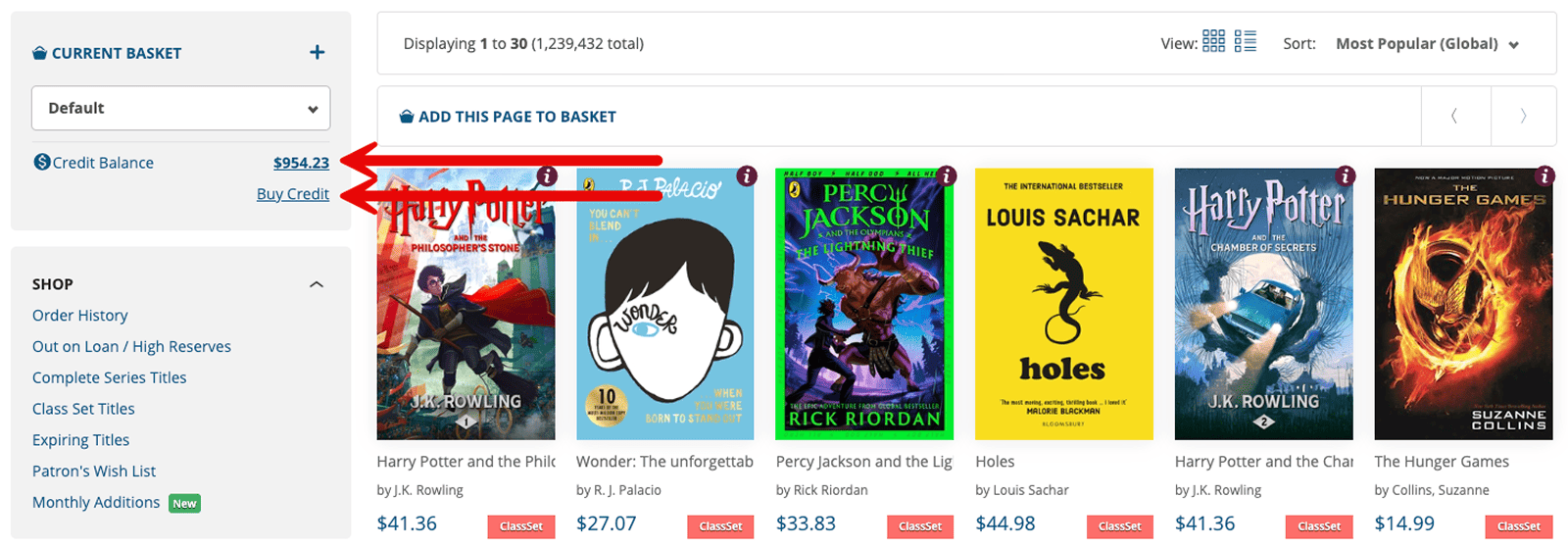
You can view your current credit balance at any time on the main Shop page. Your remaining funds are displayed in the sidebar, directly above the "Buy Credit" link.
Step 1: Access the Content Credits Page
From the Shop sidebar, click the "Buy Credit" link.
Step 2: Enter Amount
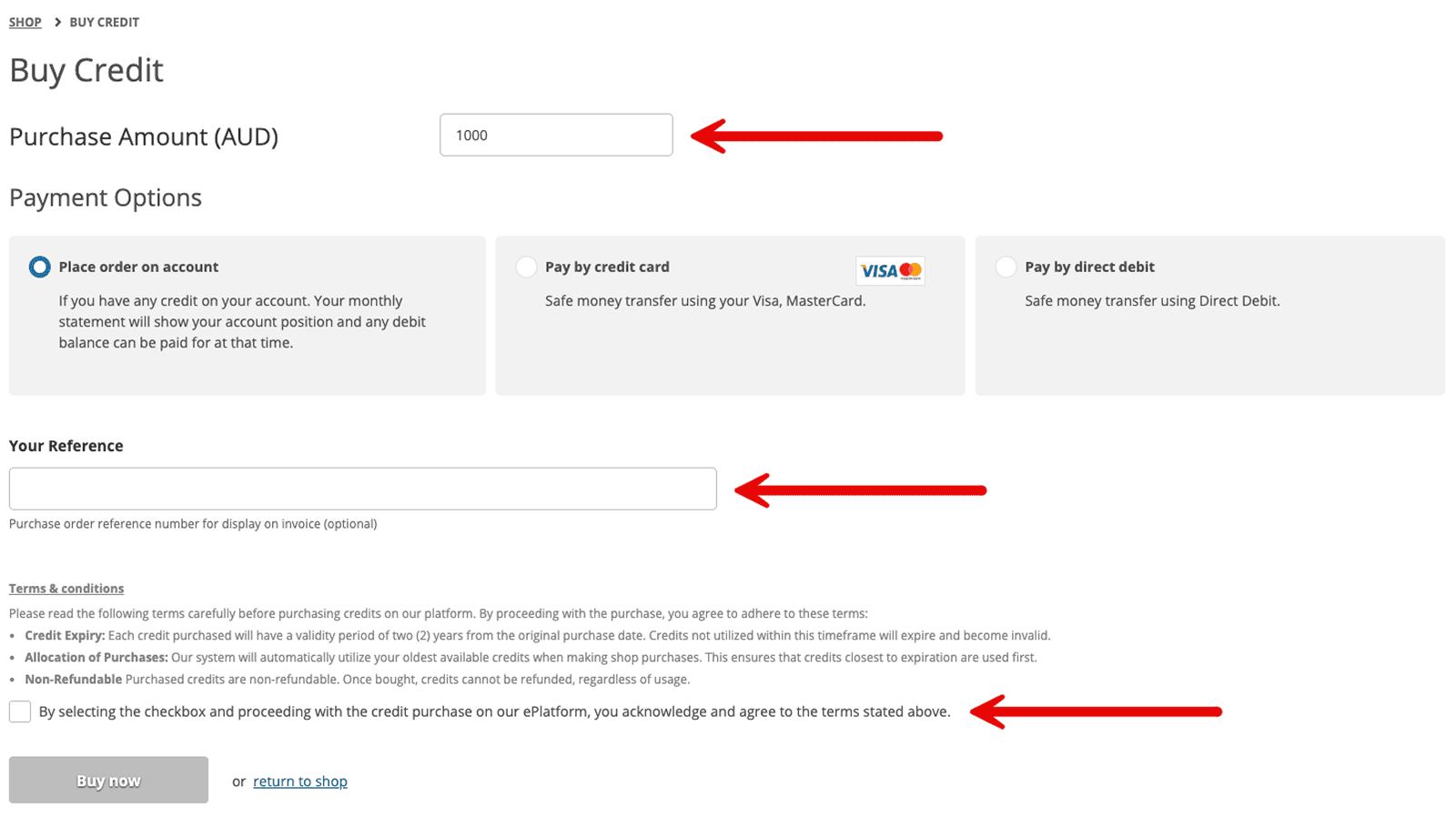
In the Purchase Amount field, enter the total value of credits you wish to add to your account.
Step 3: Select Payment Option
Choose your preferred method of payment:
- Place order on account: ePlatform will issue a monthly statement showing your account position; any debit balance can be paid at that time.
- Pay by credit card: Securely pay immediately using Visa or MasterCard.
- Pay by direct debit: Transfer funds directly using your school's bank account.
Step 4: Add a Purchase Order Reference Number (Optional)
If your school requires a specific Purchase Order (PO) number for the invoice, enter it in the Your Reference box.
Step 5: Confirm
Review the terms and conditions, tick the acknowledgement checkbox, and click "Buy now".
Terms & Conditions
Before purchasing, please be aware of the following account policies regarding your balance:
- Credit Expiry: Each credit purchased is valid for two (2) years from the original purchase date. Credits not used within this timeframe will expire and become invalid.
- Automatic Allocation: To protect your budget, the system automatically utilises your oldest available credits first when you make a shop purchase. This ensures that credits closest to their expiration date are used before newer funds.
- Non-Refundable: Once purchased, credits are non-refundable regardless of usage.
Frequently Asked Questions
Do Content Credits expire?
Yes. Each credit is valid for two (2) years from its date of purchase. We recommend purchasing a balance that you expect to spend within an 18-month period to ensure you get the full value of your budget without the risk of expiration.
How do I know which credits are about to expire?
The system handles the "housekeeping" for you. Whenever you purchase a book, the platform automatically uses your oldest available credits first. This "First-In, First-Out" method ensures that the credits closest to their expiration date are used before your newer funds.
Can I use Content Credits to pay for my annual Shared Collection subscription?
No. Content Credits are specifically designed for purchasing individual Private Titles or booking Class Sets within the Shop. Annual subscription renewals for the Shared Collection are invoiced separately.
What happens if I don't have enough credits to cover a full purchase?
If your credit balance is lower than the total cost of your basket, the system will apply your remaining credits to the total and allow you to pay the "gap" amount via your school's standard payment method (Invoice or Credit Card) at checkout.
Can I get a refund for unused credits?
Once purchased, Content Credits are non-refundable. If you have a large balance remaining and are unsure what to buy, we recommend browsing our Monthly Additions or Popular Titles lists for inspiration to ensure your budget is utilised before it expires.
Will I receive an invoice for a credit purchase?
Yes. As soon as you complete a "Buy Credit" transaction, an invoice will be generated and sent to your registered billing email address. If you included a Purchase Order (PO) number during the process, it will be clearly displayed on the invoice for your accounts department.