Schools subscribed to a Shared Collection have the unique opportunity to influence which new titles are added to the collection each month. By suggesting titles and voting on others, you can help ensure the collection remains relevant to your students without having to purchase new titles individually.
Monthly Additions
The "Monthly Additions" process is a community-driven voting system where schools nominate and vote on titles to be added to the Shared Collections.
Important Notes:
- Collection Specifics: You can only view, suggest, and vote for titles within the specific Shared Collections your school subscribes to (e.g., a UK Secondary school that is subscribed to only the eBooks Shared Collection, can only suggest ebook titles for the UK Secondary Shared Collection).
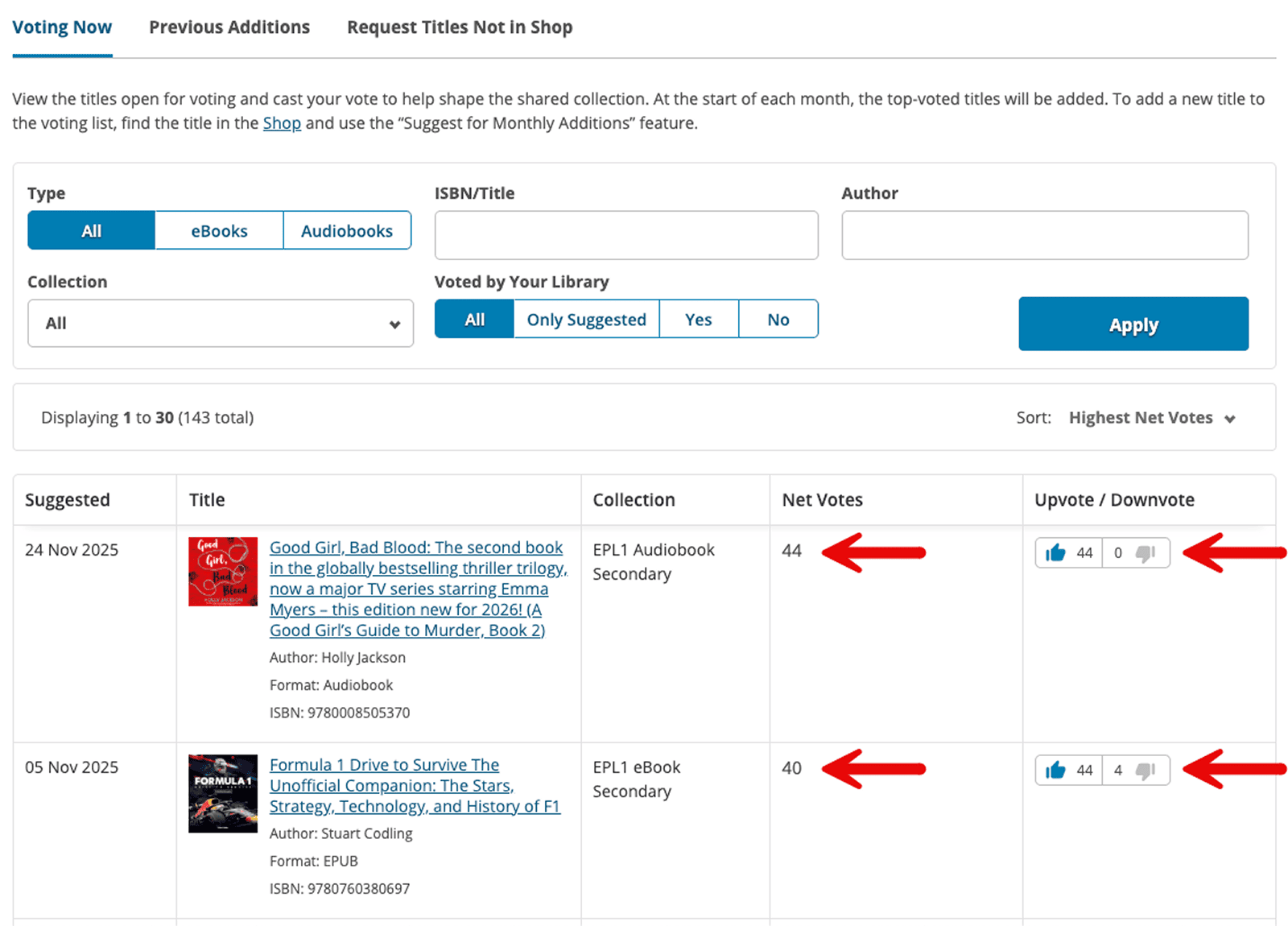
- Net Votes: The more "Net Votes" (upvotes minus downvotes) a title receives, the more likely it is to be added in the next round of additions.
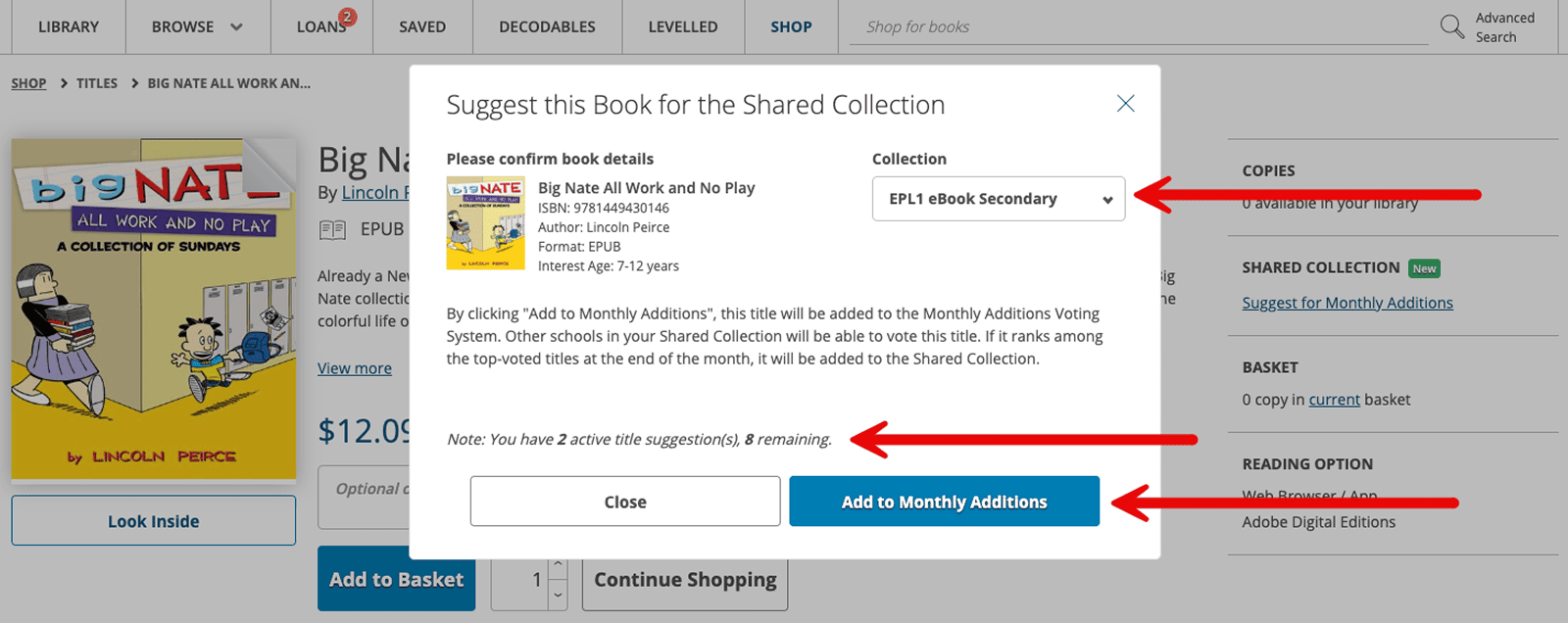
- Participation Limits: While there is no limit to how many titles a school can vote on, each school portal is limited to 10 active suggestions at any one time. If one of your suggest titles is added to the Shared Collection, you will 'earn' that suggestion back.
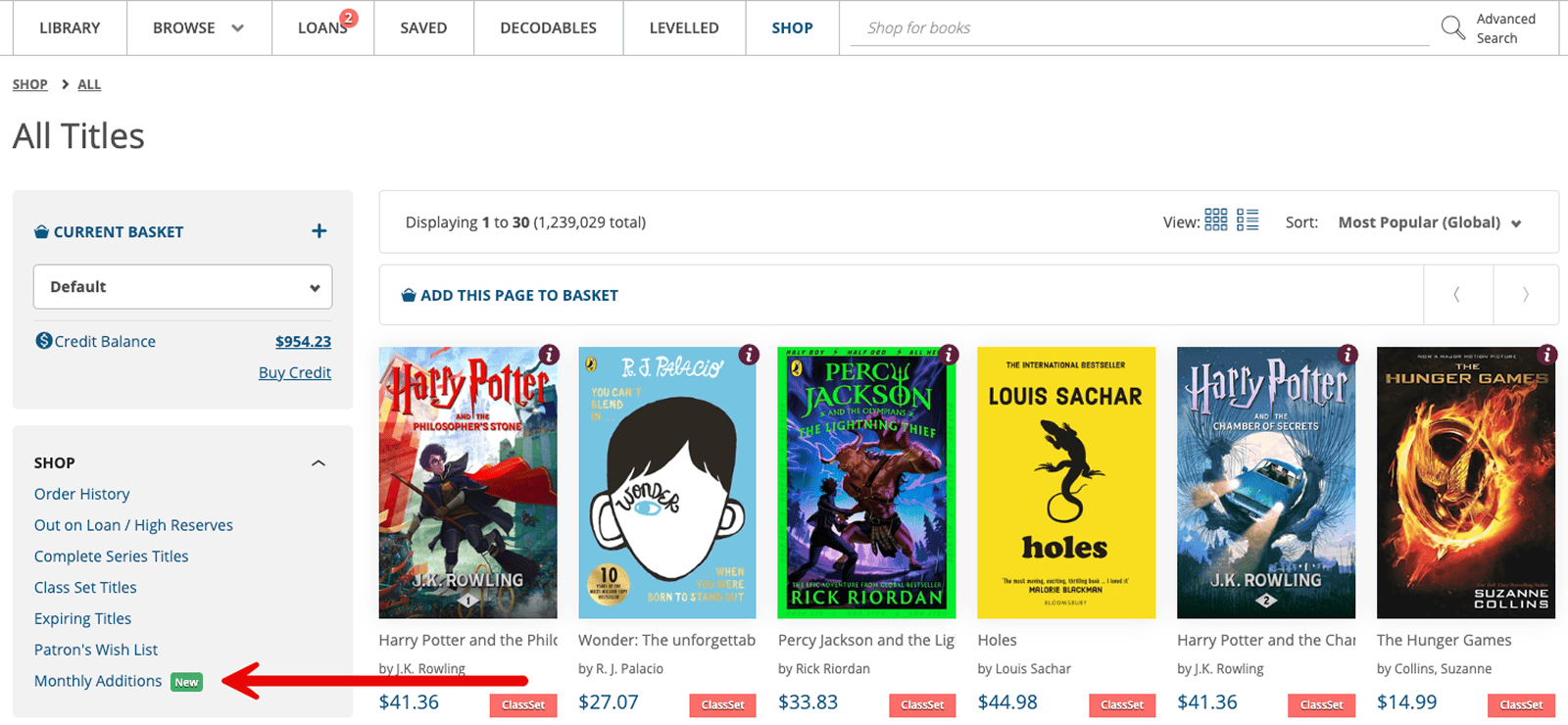
How to Suggest a Title
If there is a book you want added to the Shared Collection, you can nominate it directly from the Shop.
Step 1: Find the Book
Navigate to the Shop and search for the title you wish to suggest and click on the book to view its full details on the title page.
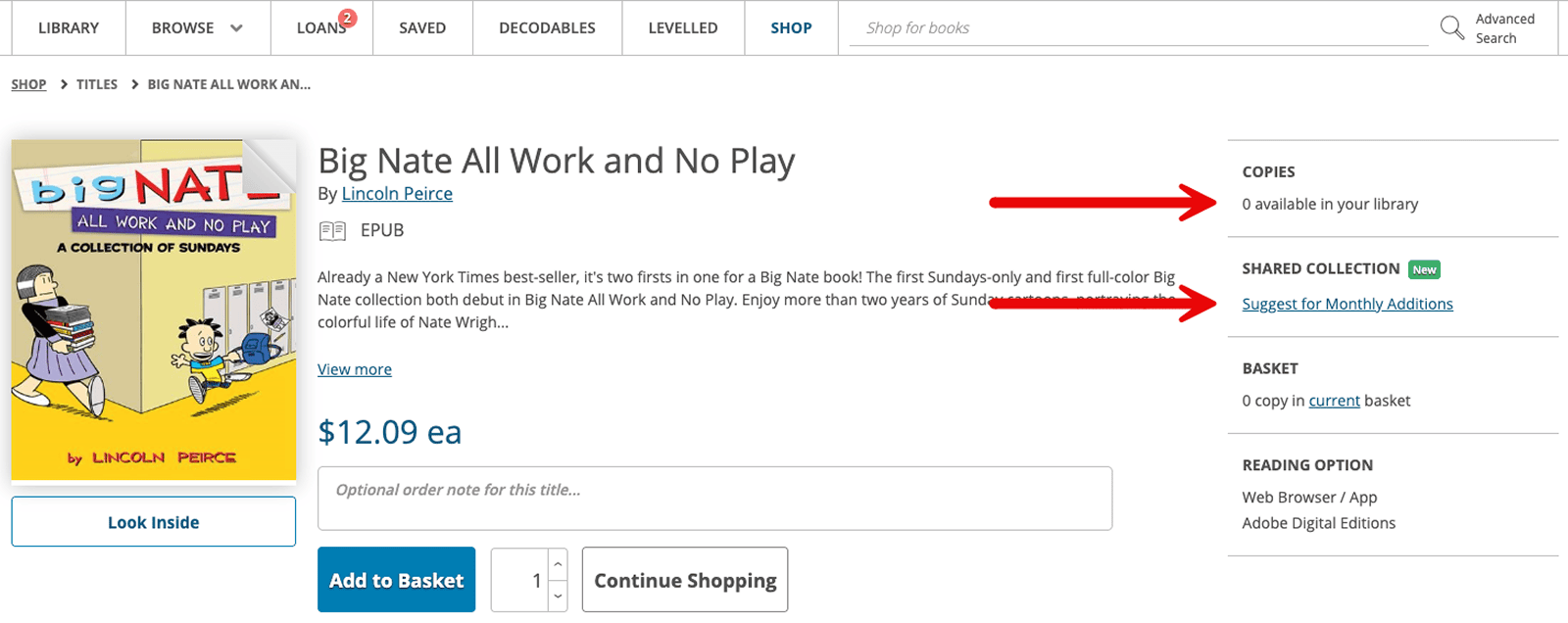
Step 3: Click Suggest
On the right-hand side of the page, click the link labeled "Suggest for Monthly Additions". Note: if the title is already in the Shared Collection, this option will not be visible.
Step 4: Select Collection
A pop-up will appear; use the dropdown menu to select which collection you are suggesting the title for (e.g. Primary vs. Secondary).
Step 5: Confirm
Click "Add to Monthly Additions" to place the book on the public voting list.
Voting Now
The Monthly Additions page is located in the Shop sidebar and is divided into three main tabs. The first, Voting Now, displays all current nominations from across the ePlatform community (for the collections your school is subscribed to).
- Voting: Use the Upvote/Downvote buttons to show your support for a title.
- Sorting: You can organise the list by Last Suggested, Highest Net votes, or Lowest Net Votes to see which titles are gaining the most traction.
- Filters: Narrow down the list by Type (eBook/Audiobook), ISBN, Author, or Collection (Primary/Secondary) to find specific nominations.
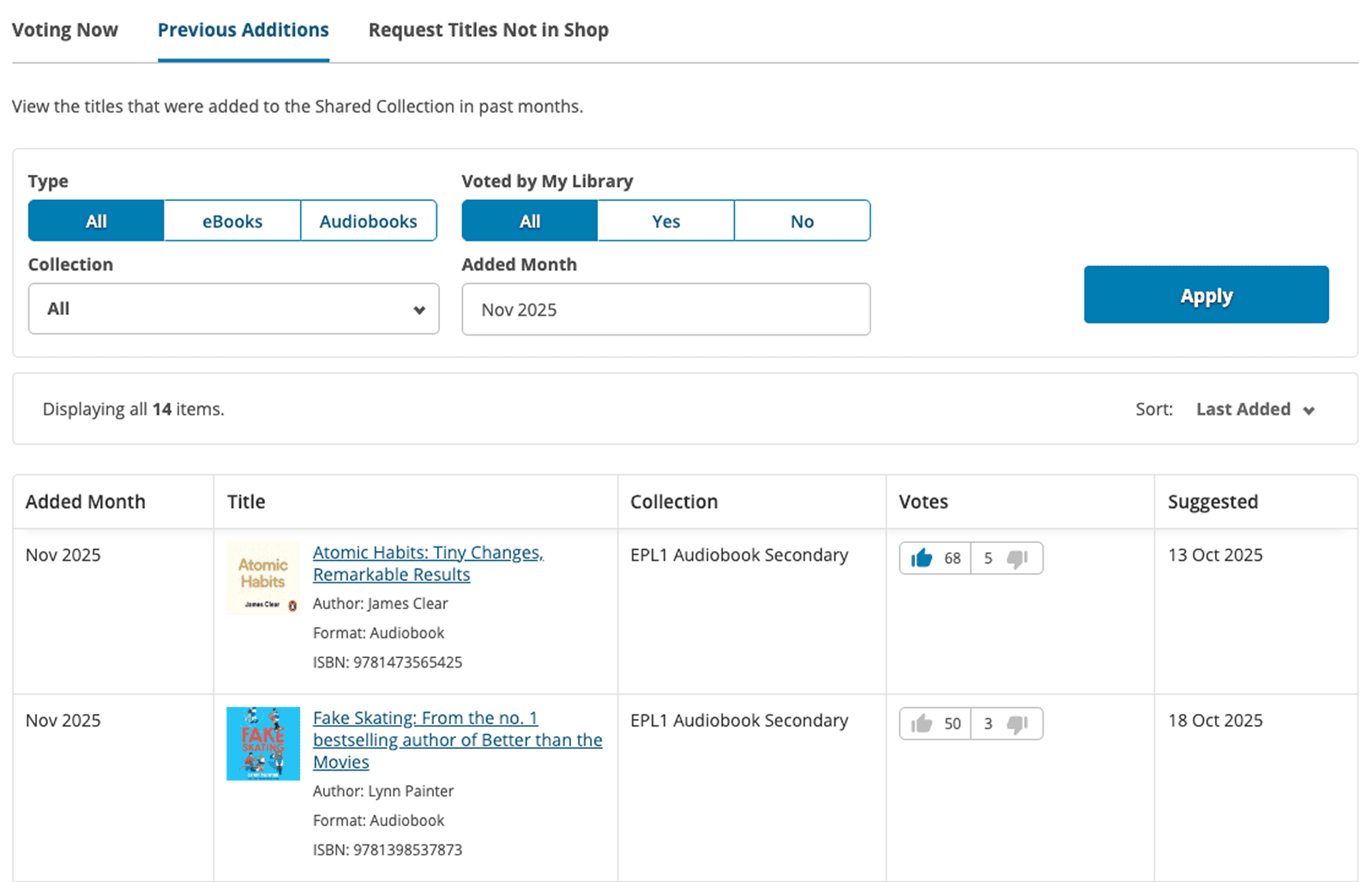
Previous Additions
This tab serves as an archive, showing titles that were successfully added to your subscribed Shared Collections in previous months.
- Visibility: Just like the voting list, you will only see additions for collections your school is currently subscribed to.
- Details: You can see the Added Month, the final Votes it received, and the date it was originally Suggested.
- Filtering: You can filter this list by Added Month to see exactly what was introduced in a specific period.
Suggest Titles Not in Shop
The ePlatform Shop contains over a million titles, but occasionally a specific book may be missing due to publisher restrictions or exclusive rights. If you cannot find a book in the Shop, you can use this tab to submit a manual request for our team to investigate.
Once you click the "Request a Title" button and submit the details, ePlatform staff will research the title's availability. Our team updates the Status column to keep you informed of their progress with notes such as "In Review," "Checking with Publisher," or "Available in Shop."
In cases where a book cannot be sourced, the status will explain the specific reason, such as "Exclusive through another provider," "Not available for Library Lending," or "Not Available in Audiobook format." If a requested title becomes available, you will be notified via email so you can purchase it for your private collection or nominate it for the Monthly Additions voting list.
Frequently Asked Questions
Why can't I suggest more than 10 books at once?
To ensure the voting list remains manageable and fair for the entire ePlatform community, each school is limited to 10 active suggestions. Once one of your suggested titles is successfully added to the Shared Collection or removed from the voting list, that "slot" opens up for you to make a new suggestion.
If a book is at the top of the "Voting Now" list, is it guaranteed to be added?
While high "Net Votes" significantly increase the likelihood of a title being added, it is not a guarantee. Our curation team must also ensure the title is available for library lending from the publisher and that it fits the collection's high-quality standards. If a top title cannot be sourced, we move to the next most popular available option.
Can my students vote for titles?
No. Suggesting and voting for Monthly Additions is an administrative feature restricted to staff with Shop access. However, students can use the "Request a Title" feature in their portal; you can then review these requests and choose to nominate them for Monthly Additions if you think they would benefit the whole community.
How often are new books added to the Shared Collection?
New titles are typically reviewed and added each month. You can see the most recent additions in the Previous Additions tab to keep track of what has been introduced to your library.
What is the difference between "Suggesting" and "Purchasing"?
Suggesting a title via Monthly Additions is an attempt to have the book added to the Shared Collection (at no cost to your school). If you need a book urgently or want it exclusively for your students, you should buy it as a Private Title instead. This guarantees immediate access for your school only.
Why is a specific book not appearing as an option to suggest?
If you search for a book and the "Suggest for Monthly Additions" link is missing, it usually means the title is already in the Shared Collection. If you cannot find the book in the Shop at all, use the Suggest Titles Not in Shop tab on the Monthly Additions page to ask our team to investigate.